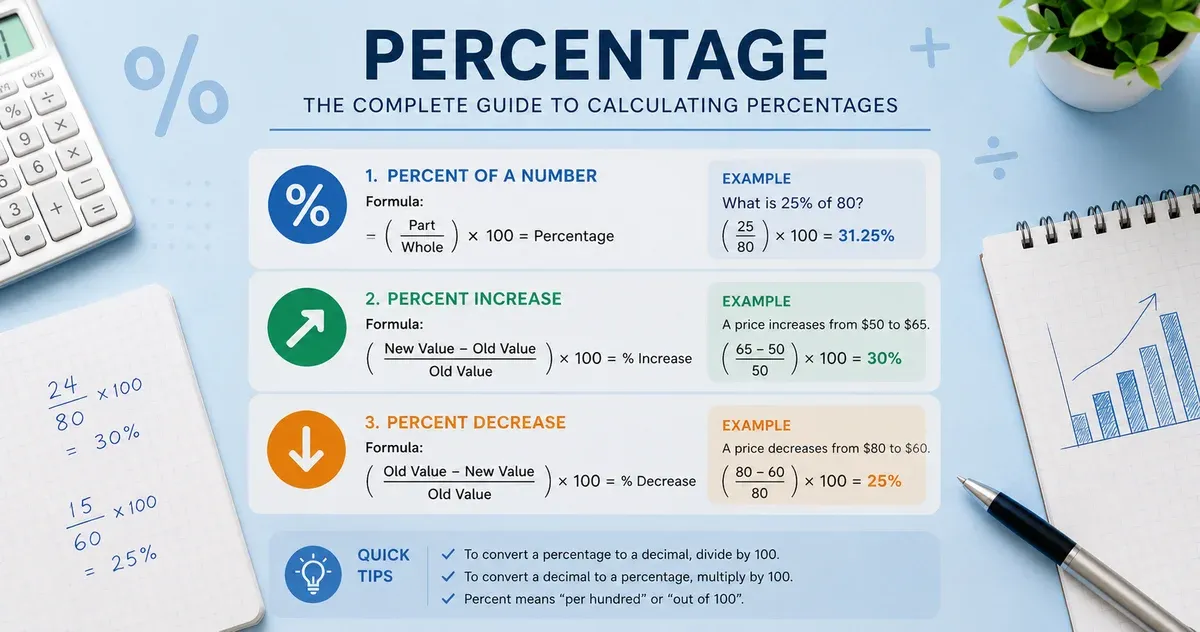
What Is a Percentage?
A percentage is a dimensionless ratio expressed as a fraction of 100. The word comes from the Latin per centum, meaning "out of a hundred." Writing a number as a percentage is a way to make comparisons easier: saying a fund returned 7.2% is more intuitive than saying it returned 0.072 of its value.
Percentages underpin an enormous range of real-world calculations — income tax brackets, credit card interest rates, nutritional labels, grade point averages, clinical trial efficacy rates, and discount pricing all rely on percentage arithmetic. Mastering the underlying formulas lets you verify any of these figures independently.
The Six Core Formulas
1. Find X% of Y (basic percent of a number)
Formula: result = (X ÷ 100) × Y
Example: 18% of $250 = (18 ÷ 100) × 250 = $45.00
2. X is what percent of Y? (find the rate)
Formula: rate = (X ÷ Y) × 100
Example: $45 is what percent of $250? = (45 ÷ 250) × 100 = 18%
3. X is Y% of what? (reverse percent / find the whole)
Formula: whole = X ÷ (Y ÷ 100)
Example: $45 is 18% of what? = 45 ÷ 0.18 = $250.00
4. Percentage change (increase or decrease)
Formula: change% = ((new − old) ÷ |old|) × 100
Example: A stock rises from $80 to $92 → ((92 − 80) ÷ 80) × 100 = +15%
5. Increase a value by X%
Formula: result = original × (1 + X ÷ 100)
Example: $200 increased by 8% = 200 × 1.08 = $216.00
6. Decrease a value by X%
Formula: result = original × (1 − X ÷ 100)
Example: $200 decreased by 8% = 200 × 0.92 = $184.00
Practical Applications by Context
Personal Finance: Calculating a 20% tip on a $65 restaurant bill ($13.00), or determining what a 3.5% savings account APY earns on a $5,000 balance after one year ($175.00). Keep in mind that APY calculations for compound interest require additional steps beyond simple percentage arithmetic.
Shopping and Discounts: A $120 jacket marked 35% off costs $120 × (1 − 0.35) = $78.00 before tax. If your state adds 8.25% sales tax, the final price is $78.00 × 1.0825 ≈ $84.44. This tool handles each step separately; chain the operations yourself for multi-step scenarios.
Business and Investing: Gross margin percentage = ((revenue − cost) ÷ revenue) × 100. If a product sells for $50 and costs $32 to produce, the gross margin is ((50 − 32) ÷ 50) × 100 = 36%. Note that margin and markup are different figures — markup is calculated over cost, not revenue.
Academic Grading: A student scores 73 out of 85 points. Their percentage score = (73 ÷ 85) × 100 ≈ 85.9%. Always verify how your institution rounds final grades.
Common Mistakes to Avoid
- Confusing percentage points with percentages: If an interest rate rises from 4% to 5%, that is an increase of 1 percentage point — but it is a 25% increase in the rate itself. The two phrasings are not interchangeable.
- Applying percentage increases and decreases sequentially: A 50% increase followed by a 50% decrease does not return to the original value. $100 × 1.50 = $150; $150 × 0.50 = $75 — a net loss of 25%.
- Using percentages without a clear reference base: "Sales improved 200%" is meaningful only if you know the starting figure. Always state what the percentage is calculated against.
- Rounding intermediate results: Rounding before the final step introduces accumulated error. Keep full precision until the last calculation.
Limitations of This Tool
This calculator handles single-step percentage arithmetic. It does not calculate compound interest, loan amortization schedules, or multi-period growth rates — those require dedicated financial calculators. The results depend entirely on the numbers you enter; always verify inputs when working with financial data that affects decisions.
When Not to Use This Calculator
This tool solves single-step percentage arithmetic — it is not a substitute for a payroll or tax calculator when withholding, brackets, or compounding are involved. Income tax is rarely a flat percentage of gross pay because of tiered brackets and deductions, so "what is 22% of my paycheck" understates or overstates real withholding; for a US paycheck estimate use the salary calculator's FICA estimate instead. Likewise, a savings account or loan that compounds over multiple periods is not a single percentage step — model it with the site's dedicated interest and loan calculators. Use this tool for the arithmetic itself, not as a stand-in for a specialized financial model.
Three Worked Walkthroughs
- Diego's restaurant discount stack: Diego has a $64 bill with a 15% loyalty discount and 8% local sales tax added after the discount. He runs "decrease by 15%" on $64 to get $54.40, then a separate "increase by 8%" on $54.40 to get $58.75 — chaining the two single-step results because the tool intentionally keeps each operation transparent rather than guessing the order for him.
- Hannah's raise negotiation: Hannah earns $58,000 and is offered a raise to $61,500. Using the percentage change mode: (61,500 − 58,000) ÷ 58,000 × 100 = 6.03%, which she can compare against her company's stated raise pool before responding.
- Tom's grade weighting: Tom scored 42 out of 50 on a midterm worth 30% of his final grade. He first finds 42 is what percent of 50 (84%), then finds 84% of the 30% weight to see the midterm contributed 25.2 percentage points to his final grade.
Percentage Calculator vs. a Spreadsheet or Generic Search Widget
| Factor | This calculator | Spreadsheet | Generic search-result widget |
|---|
| Shows the formula | Always, with your numbers substituted | Only if you write it out | Rarely shown |
| Covers all six problem types | Yes, one interface | Requires separate formulas per type | Usually one type per page |
| Sign-up or ads required | No | No | Often ad-supported |
| Data leaves your device | Never | Never (local file) | Frequently, for analytics |
Chaining Percentage Math With Other Tools
Percentage arithmetic is the building block behind several other calculators on this site. Once you've worked out a raise or discount here, the credit card payoff calculator and savings goal calculator both take a percentage-based rate as one of their core inputs, and the tip calculator and VAT calculator are purpose-built versions of the "increase/decrease by X%" formula above for two specific everyday scenarios.